

It is 7:40 on a Friday. Your host is seating a party of eight while the phone, the website chat, and Instagram all ask the same things: are you open late, is there parking, is there a table at nine?
Restaurant automation can take those questions off the host stand. The trick is knowing which ones to hand over.
Why Guest Questions Pile Up During Service
Guest questions don’t arrive evenly throughout the day. They arrive at exactly the moment your team is busiest, because that is when people are deciding where to eat.
The Same Questions, Every Shift
Ask any host what they get asked, and you will hear the same short list. What time do you close? Any tables tonight? Do you have vegetarian options? Is there a car park? Do you take large groups?
None of these are hard. Every answer is already written down somewhere, on your website, your menu, or a note pinned behind the bar. The problem is not knowledge. It is that the person who knows the answer is also carrying three plates.
What Unanswered Questions Cost You
Restaurant customer service has always been judged in person: the welcome, the timing, the way a complaint is handled. But a growing share of first impressions now happens before the guest arrives, in a message they sent while choosing between you and the place down the road.
If that message waits until close, the guest has usually booked somewhere else. If it gets a vague reply, they may not trust the rest of the experience either. And the guests who ask questions before booking are often the ones planning a special occasion, which makes them exactly the guests you least want to lose. Unanswered questions rarely show up in your reports, but they show up in the covers you never got.
Why The Phone is the Worst Channel at 8 p.m.
The phone feels like the most personal channel, and at 3 p.m. it is. At 8 p.m. it is the most disruptive one. Every call pulls someone off the floor, and the guest on the other end often waits through several rings before anyone picks up.
Messages are different. They can wait a minute without the guest hanging up, and they can be answered without anyone leaving a table. That makes them the natural place to start with restaurant automation, long before you touch the phone line.
Sorting Guest Questions by Risk
The useful way to think about restaurant automation is not “which questions are most common.” It is “which questions are safe to answer without a person.” Sort them by risk and the decisions get much easier.
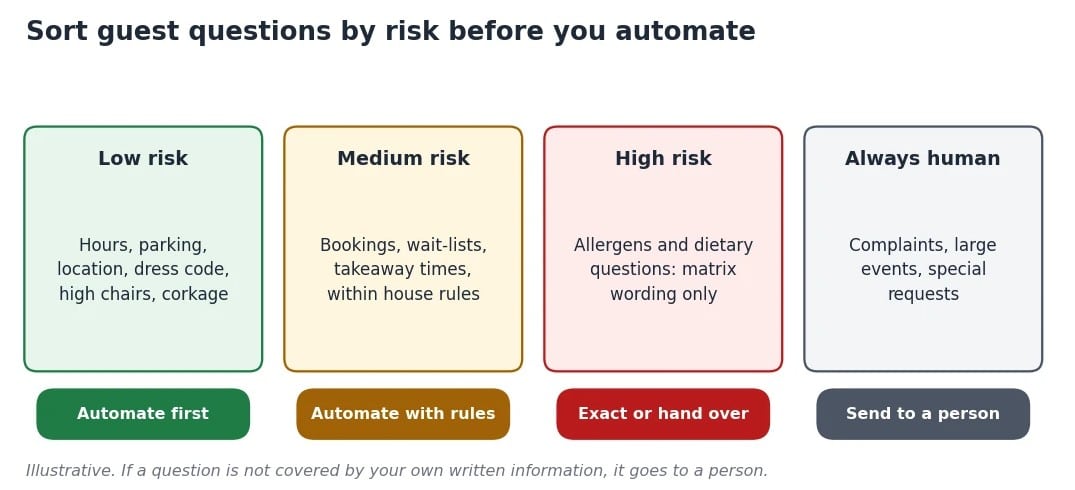
Sort guest questions by risk before you automate anything.
Low Risk: hours, Parking, Location, and House Rules
Opening hours, last orders, parking, dress code, high chairs, corkage. These have one correct answer; it rarely changes, and a wrong answer is an inconvenience rather than a disaster.
These are the questions to automate first. They make up a large part of what interrupts your host, and they are the easiest to get right. If restaurant automation does nothing else for you, taking these off the host stand is already worth the setup.
Medium Risk: Bookings, Wait-lists, and Takeaway Times
Bookings can be automated, but only within your house rules: party size limits, deposit policies, how long a table is held. If you already use restaurant booking software, any automated reply should follow the same rules, not invent its own.
When the book is full, a good setup takes the guest’s name and number for the waitlist instead of replying “fully booked” and ending the conversation. That is a booking you might still get.
High Risk: Allergens and Dietary Questions
Allergen questions are where restaurant automation earns trust or loses it. According to Food Allergy Research & Education, more than 33 million people in the US live with food allergy. For those guests, “it should be fine” is not an answer.
If you automate allergen questions at all, the answers must come word for word from the allergen matrix your kitchen has signed off. If a dish or ingredient is not listed, the only acceptable reply is to say so and pass the question to a person. No guessing, no paraphrasing, no “probably.”
The same applies to cross-contact. If your kitchen uses shared fryers, shared prep areas, or shared equipment, that belongs in the matrix too, written the way your kitchen would explain it to a guest standing at the pass. A guest with a severe allergy needs the whole picture, not just the ingredient list.
Always Human: Complaints, Large Events, and Special Requests
A complaint about last night’s service, a wedding inquiry, a request for a birthday cake with a specific message. These need a person, and the guest needs to feel that a person heard them. A fast automated reply to a complaint can feel worse than a slower human one, because it suggests nobody is really listening.
Automation can still help here, by collecting the details and handing them over cleanly. It should never try to resolve them on its own.
What Restaurant Automation Looks Like in Practice
The good version of this is less dramatic than most demos suggest. It answers the boring questions well and gets out of the way for the rest.
Answering From Your Own Menu and Rules
The most important design choice is where the answers come from. A restaurant chatbot that answers from your menu and your own booking rules gives guests the same answer your host would. A general-purpose chatbot answering from the wider internet will happily describe a dish you do not serve.
Platforms such as Agentency can answer guest questions from your own menu, allergen notes, and booking rules, and decline when the answer is not there. That decline is the feature to look for. Of all the chatbots for customer service you could put in front of guests, the right one is the one that knows when to stop.
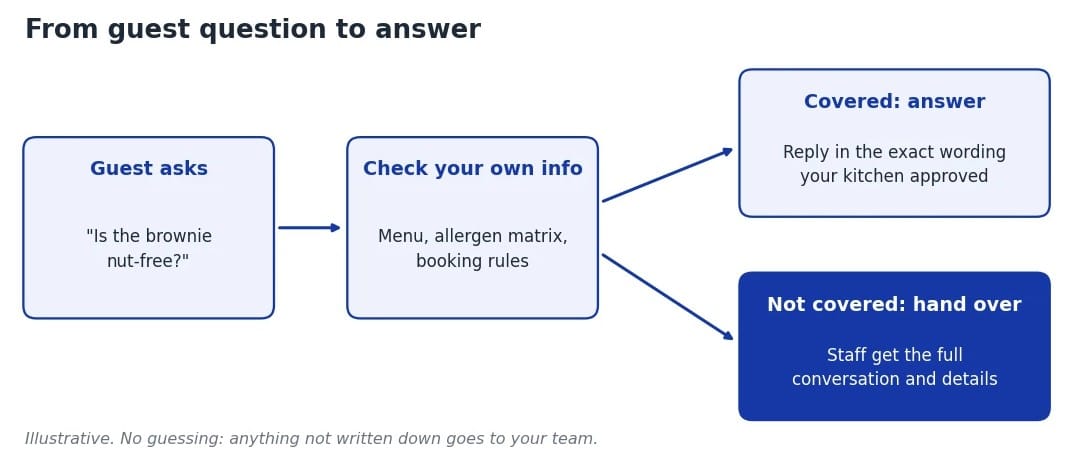
Answer from your own knowledge, and hand over anything that isn’t written down.
Handing Over to Staff With the Full Conversation
When a question needs a person, the handover matters as much as the answer. Your manager should see the whole conversation: who asked, what they asked, and what has already been said. With that in front of them, a two-minute call can settle what would otherwise take a long back-and-forth.
Without that, the guest repeats themselves to a human after already explaining it to a machine. That is the fastest way to make automation feel like a wall instead of a service.
Keeping the Answers Current
Menus change. Specials rotate. A dish runs out at 9 p.m., and the kitchen calls it off. Any answer about tonight’s menu is only as good as the last time someone updated it.
Treat the information behind your restaurant automation like part of your pre-service checklist. Specials, items that have run out, and any change to opening hours should be updated before doors open, not after a guest has been told something that is no longer true.
Covering The Channels Guests Actually Use
Guests do not all use your website. Many message the number on your Google listing, reply to an Instagram post, or send a message on Facebook.
A restaurant automation system that only works on the website answers some of your guests and ignores the rest. The better approach is one set of answers, kept in one place, available on the website, WhatsApp, Instagram, and Messenger. Update your opening hours once, and every channel has them. It also means the answer on Instagram at midnight matches the answer your host gives in person the next evening, which is what guests expect even if they never say it.
How to Introduce Restaurant Technology Without Losing the Personal Touch
Good restaurant technology should make your team feel more available to guests, not less. Introduce it in the right order, and it will.
Step 1: List the Questions Your Host Answers Every Shift
Spend a week writing down every question that reaches your host, your phone, your inbox, and your social accounts. You will probably find twenty or so that cover most of the volume.
Step 2: Write the Answers Down Once, Including the Allergen Matrix
Write a short, clear answer to each one. Make sure your allergen matrix is current, complete, and approved by the kitchen. If the answers only exist in someone’s head, no system can use them, and neither can a new member of staff. Keep the language plain. Guests read these answers on a phone, often while walking.
Step 3: Decide What Always Goes to a Person
Agree as a team which topics are never automated: complaints, large events, anything involving payment disputes, and any allergen question not covered by the matrix. Write these down too.
Step 4: Test it with the Questions Guests Really Ask
Before guests see anything, ask the system your real questions, word for word, including the clumsy, misspelled versions guests actually send. Then ask the awkward ones: an allergen you do not list, a party of fifteen on a Saturday, a request for a table that does not exist. Wrong answers here usually point to gaps in your own information.
Step 5: Review the Questions it Could not Answer Every Week
The questions that get handed over are a to-do list. Each one is either something that genuinely needs a person or something you never wrote down. Fix the second kind and the system gets better every week.
Step 6: Tell your Team What Changed
Your staff needs to know what guests are being told automatically, and what will reach them instead. A server who does not know the system has already confirmed a booking will cause more confusion than the system saved.
A five-minute briefing before the first service is usually enough. After that, the handover messages do most of the explaining.
Where This Fits in 2026 Restaurant Technology Trends
Most lists of hospitality technology trends focus on robots, kiosks, and kitchen automation. The quieter change is in how restaurants answer the questions that come before a booking.
Softer Traffic Makes Every Reply Count
The National Restaurant Association’s 2026 State of the Restaurant Industry report found that 60% of operators reported softer customer traffic in 2025, and it points to digital ordering, automation, and data analytics as areas where operators are investing.
When traffic is soft, a guest who asked about a table and heard nothing is not a small loss. Restaurant customer service now starts in the inbox, and the restaurants that answer first tend to fill the tables first.
Where AI Actually Helps
Most talk about AI in restaurants is about forecasting, ordering, and labor scheduling. All useful, and all a long way from the host stand. But for most operators, the first practical use of restaurant AI is much simpler: answering routine questions accurately, at any hour, from information the restaurant already controls.
Hospitality technology has a habit of promising to transform everything at once. Where technology and restaurants meet best is in the background. Guests should notice faster answers and a calmer host stand, not the software. Plenty of tools now sell themselves as AI for restaurants. Judge them by whether they make your service feel more human, not less.
Frequently Asked Questions
Restaurant automation works best when it handles the routine and protects the human moments. Start with your twenty most common questions, keep allergens exact, and let your team focus on the guests in the room.
More Tips to Grow Your Business
Revfine.com is the leading knowledge platform for the hospitality and travel industry. Professionals use our insights, strategies, and actionable tips to get inspired, optimize revenue, innovate processes, and improve customer experience.Explore expert advice on management, marketing, revenue management, operations, software, and technology in our dedicated Hotel, Hospitality, and Travel & Tourism categories.




Leave A Comment